Syncing Data
Elite DevOps Network
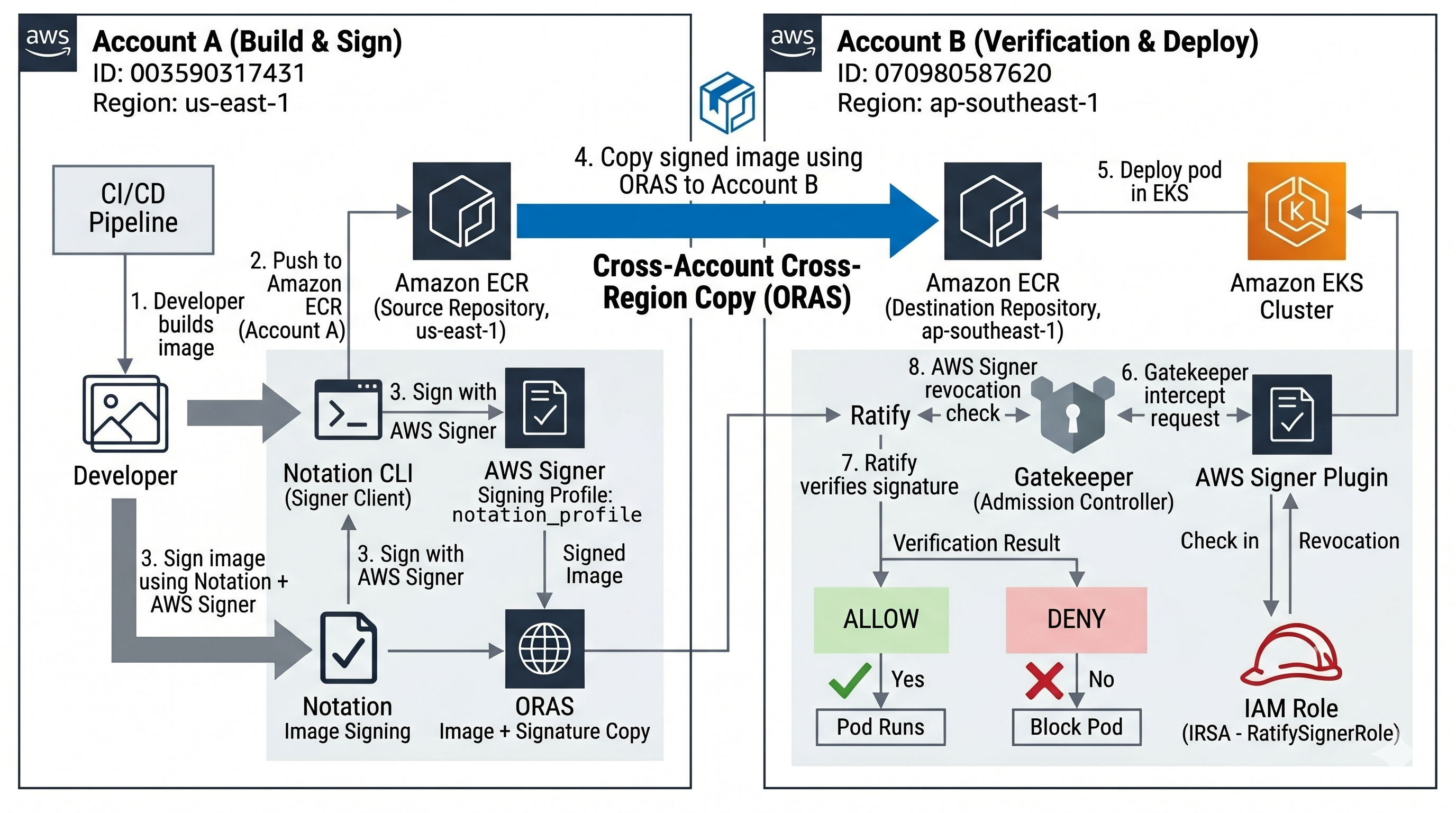
You have two AWS accounts. Account A is in Virginia (us-east-1) and is responsible for building and signing container images. Account B is in Singapore (ap-southeast-1) and runs a Kubernetes cluster that only allows signed images to run — anything unsigned gets blocked before it even starts.
The goal is to set up the full pipeline: Account A signs an image, that signed image (along with its signature) gets copied to Account B's own container registry in Singapore, and then Account B's Kubernetes cluster is configured to automatically verify the signature on every image before allowing it to run.
| Account | ID | Region | Role |
|---|---|---|---|
| Account A | 418272410152 |
us-east-1 | Signs images |
| Account B | 736591847023 |
ap-southeast-1 | Runs EKS, enforces signatures |
Replace these IDs with your actual account IDs everywhere in this guide.
Account B gets its own local ECR repo in ap-southeast-1. The image is copied there once. After that, the EKS cluster always pulls images from Account B's own registry in the same region — no cross-region pulls at runtime.
The signing profile ARN is embedded inside the signature — verification is local. When Account A signs an image, the ARN of the signing profile (e.g. arn:aws:signer:us-east-1:418272410152:/signing-profiles/notation_profile) gets written into the signature itself. When Ratify verifies the image later, it reads that ARN out of the signature and compares it against the trustedIdentities list configured in verifier.yaml — specifically this line:
1trustedIdentities:2 - "arn:aws:signer:us-east-1:418272410152:/signing-profiles/notation_profile"If the ARN in the signature matches this value, the identity check passes. This comparison is done locally by Ratify — no live call to Account A's region is needed for this part.
Revocation checks do make a live HTTPS call to Account A's Signer endpoint. Ratify calls signer.us-east-1.amazonaws.com to confirm the signing job has not been revoked. This is a plain HTTPS API call — no VPC peering, no private networking, no special setup beyond the IAM permission granted in step 1.4.
Resource Filter
Complete related list of resources
Topic based resources