Syncing Data
Elite DevOps Network
Before you touch a single AWS service, you need to understand the foundation. Every decision you make - where to deploy, how to design for availability, how to reduce latency - traces back to understanding how AWS is structured globally. Engineers who skip this foundation spend months debugging problems that are architectural, not code-level.
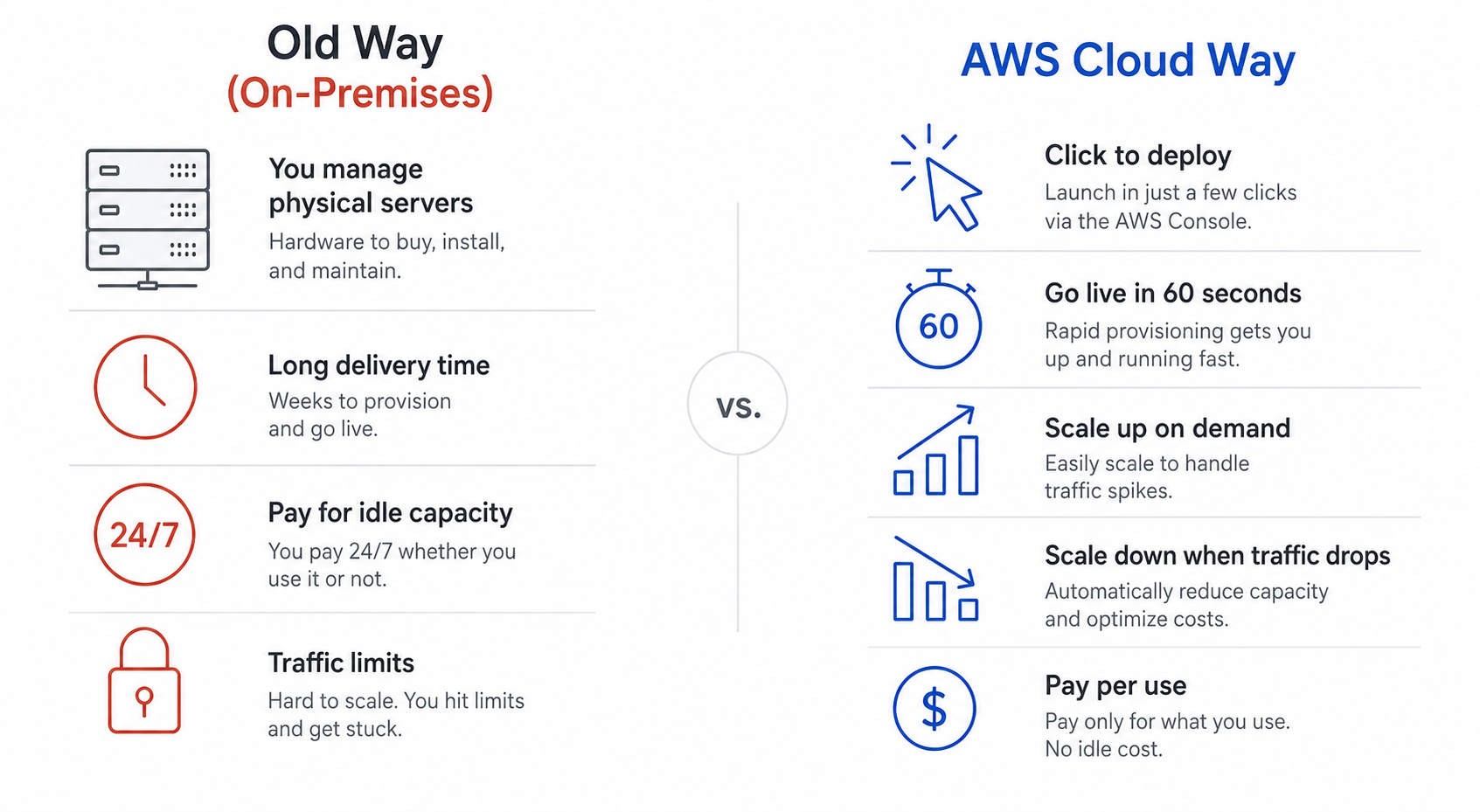
AWS (Amazon Web Services) is a cloud provider. Instead of buying physical servers, networking equipment, and storage hardware, you rent it from AWS - on demand, paying only for what you use.
Think of it like Swiggy - they don't own a fixed fleet of bikes for every city. They scale delivery partners up during lunch rush and down at midnight. AWS does the exact same thing for your servers:
Amazon.in, Netflix, Swiggy, BYJU'S, Zomato, Zerodha, Razorpay, and Hotstar all run on AWS. It's not just for big companies - a solo developer in Pune uses the same infrastructure as a billion-dollar startup.
💡 Tip: AWS didn't start as a product. Amazon built it for their own e-commerce platform, then opened it to the world. That's why it's battle-tested - it was built to survive Amazon's own scale first.
AWS has 200+ services, but you don't need all of them. Here's what gets built with the core ones:
| Category | AWS Services Used | Real Indian Example |
|---|---|---|
| Web & Mobile Apps | EC2, S3, API Gateway, Lambda | Meesho, ShareChat backends |
| Video Streaming | CloudFront, Elastic Transcoder | Hotstar, SonyLIV |
| Payments & Fintech | RDS, Lambda, KMS | Razorpay, Zerodha, Paytm |
| Big Data & Analytics | S3, Athena, Redshift | UPI transaction analytics, IRCTC |
| Machine Learning | SageMaker, Rekognition | Vernacular language AI, fraud detection |
| Backup & Compliance | S3 Glacier, AWS Backup | Bank data, RBI mandates |
📌 Remember: Mastering 15-20 core AWS services covers 90% of real-world DevOps work. That's exactly what this course focuses on.
This is the single most important concept to understand before using any AWS service.
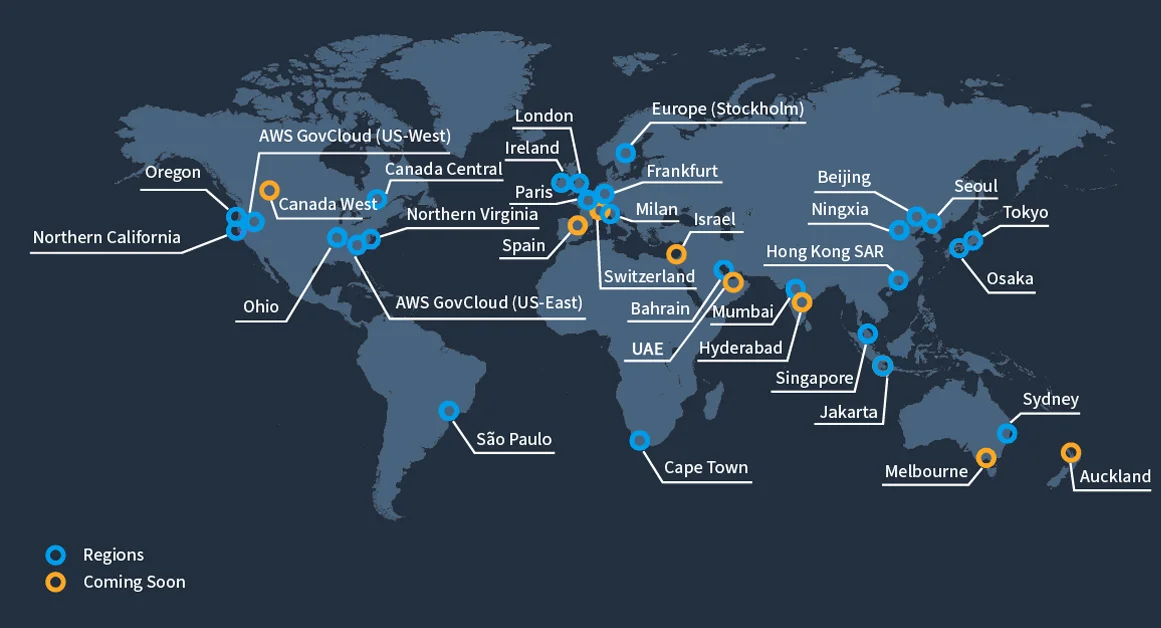
A Region is a cluster of data centers in a specific geographic location. Each has a code name — ap-south-1 is Mumbai, us-east-1 is Virginia, eu-central-1 is Frankfurt. Most AWS services are region-scoped: an EC2 instance you launch in Mumbai is completely invisible when you're looking at Singapore. Resources don't cross regions automatically.
Every Region contains multiple AZs (usually 3, min 3, max 6). Each AZ is one or more discrete data centers — physically separated, on different power grids, connected by AWS's own private high-bandwidth fiber.
1Mumbai Region (ap-south-1):2 ap-south-1a → Data centers in one part of Mumbai3 ap-south-1b → Data centers in a separate location4 ap-south-1c → Data centers in a third location5 6 A flood in 1a does NOT affect 1b or 1c.7 All three connected by AWS private fiber - ultra-low latency.This is why you always deploy across multiple AZs. If your entire app runs in ap-south-1a and that AZ goes down, you're fully down.
AWS has 400+ Edge Locations across 90+ cities. These aren't full regions - they're smaller caching and routing points close to end users. India alone has 10+ edge locations.
1A user in Chennai opens your app (EC2 is in Mumbai):2 Without Edge: Chennai → Mumbai (~15ms, fine)3 Without Edge: Chennai → Virginia (~200ms, painful for streaming)4 With CloudFront: Chennai → Chennai Edge Location → cached content → instantEdge Locations power CloudFront (CDN), Route 53 (DNS), and Global Accelerator.
Global vs Regional Services - the one thing that confuses everyone:
| Scope | Services | Behaviour |
|---|---|---|
| Global | IAM, Route 53, CloudFront, WAF | Create once, works everywhere. No region to pick. |
| Regional | EC2, S3, RDS, Lambda, VPC, ECS | Exists independently per region. Switch region = different resources. |
📌 Remember: When you switch regions in the AWS console (top-right dropdown), your EC2 instances, RDS databases, and Lambda functions all change. You're looking at a completely different environment. IAM users don't change - they're global.
| Factor | Question to Ask | Why It Matters |
|---|---|---|
| Compliance | Does your data have legal residency requirements? | RBI mandates that payment data of Indian users must be stored in India. GDPR requires EU data to stay in EU. AWS guarantees data never leaves a region without your explicit permission — which is why ap-south-1 (Mumbai) matters for Indian fintech. |
| Proximity | Where are your users? | Closer region = lower latency. A user in Bangalore hitting ap-south-1 (Mumbai) gets ~10ms. The same request to us-east-1 (Virginia) gets ~200ms — 20x slower. For an app like Swiggy, that difference is the gap between a fast order and a frustrated user. |
| Service Availability | Is the service you need available in this region? | Not all 200+ AWS services are in every region. New services launch in us-east-1 first, then roll out globally. Always check before architecting. |
| Pricing | Same service, different price? | AWS pricing varies by region. Running the same EC2 in us-east-1 vs ap-south-1 can differ by 10-15%. |
🔴 Common Mistake: Defaulting tous-east-1because it's the AWS console default — even when your users are in India and RBI mandates local data storage. If you're building for Indian users, start inap-south-1(Mumbai). Always make this decision deliberately.
AWS spans all three cloud computing delivery models. Knowing which model a service falls under tells you how much you need to manage.
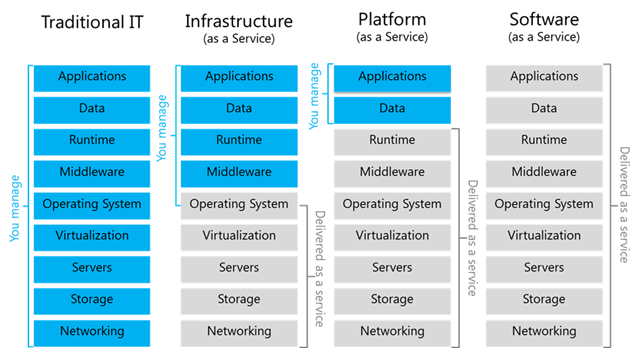
| Model | Full Name | You Manage | AWS Manages | AWS Example |
|---|---|---|---|---|
| IaaS | Infrastructure as a Service | App, OS config, patching | Hardware, networking, virtualization | EC2 |
| PaaS | Platform as a Service | Application code only | Everything else | Elastic Beanstalk |
| SaaS | Software as a Service | Nothing (just use it) | Everything | Rekognition, WorkMail |
Most DevOps work sits at the IaaS level (EC2, VPC, RDS) with some PaaS services (Lambda, ECS Fargate) layered in for specific workloads.
The Shared Responsibility Model goes hand-in-hand with understanding service models. The more you manage (IaaS), the more security responsibility you carry:
1AWS is responsible FOR the cloud.2You are responsible IN the cloud.| AWS's Responsibility | Your Responsibility |
|---|---|
| Physical data center security | IAM users, roles, and permissions |
| Hardware failures | Security group configuration |
| Hypervisor and network infrastructure | OS patching on EC2 |
| Global network uptime | Application-level security |
| Availability of the service itself | Encryption of your data |
⚠️ Security: In 2021, a misconfigured S3 bucket exposed Aadhaar-linked data of millions of Indians — that was the company's fault, not AWS's. AWS provided the bucket. The company left it public. Your configuration is your responsibility.
Before you deploy a single resource, spend 10 minutes understanding the environment. Open console.aws.amazon.com — the AWS Management Console. Three things to note immediately: the Region selector (top right, always check this first), the Search bar (fastest way to find any service), and the fact that switching regions shows you a completely different set of resources.
https://infrastructure.aws/ — explore the interactive global map, find India's edge locationsap-south-1 (Mumbai) — this is your default for Indian workloadshttps://aws.amazon.com/about-aws/global-infrastructure/regional-product-services → search for "Lambda" → find which regions don't have itap-south-1 (Mumbai) and us-east-1 (Virginia) → your instances are completely separate — like two different countries💡 Tip: Pin EC2, IAM, VPC, S3, and CloudWatch to your console toolbar. As a DevOps engineer, you'll live in these five services daily.
Expected Result: You understand that AWS is not one place. It's a global network of isolated regions (each with multiple AZs), stitched together by a private backbone, with 400+ edge locations pushing content close to users — including 10+ across India alone.
Resource Filter
Complete related list of resources
Topic based resources